NetSuite 2024.2 – A look at our top 10 features

Sophie Lowe
September 11, 2024
It’s that time of year once again. The upcoming NetSuite 2024.2 release is set to be seamlessly deployed from August to October, with a monthly rollout of phases. This approach guarantees that every user can take advantage of each improvement and new feature incorporation without encountering any service disruption.
As we continue to support our NetSuite clients to get the best from their system, we turned to Jack Loudon, our expert NetSuite Solution Consultant to share his top ten features from the recent release.
Number 10 – Rebates Enhancement:
Enhancements to the Rebates & Trade Promotions module have been introduced to improve efficiency and profitability by centralising and automating rebate processes. Key updates include:
- Expanded Rebate Capabilities
Rebates can now be applied to both sales and purchase transactions, not just sales.
- Customisable Default Rebate Tiers
Users can select default rebate tiers rather than relying on the system’s automatic lowest range.
- Enhanced Rebate Recalculation
The module now updates rebate amounts dynamically based on agreements and new tiers, ensuring more accurate rebate management.
These improvements offer greater flexibility and control, especially for distribution companies, B2B businesses, and manufacturers.
Number 9 – Electronic Bank Payments Enhancements:
The Electronic Bank Payments module has received several key updates to improve payment processing, reporting, and notification management:
- Email Notifications
You can now set return and custom email addresses for response notifications and send reminder emails to approvers of pending payment batches.
- Approval Limits
Approval limits can be set for rules instead of individual employees, reducing unnecessary email notifications for amounts exceeding set limits.
- Credit Transactions
A new “Include All Credits” checkbox allows users to view all credit transactions on bill and invoice payment processing pages.
These enhancements streamline EFT payments, customer refunds, and check fraud prevention, making payment processing more efficient and user-friendly.
Number 8 – Quality Management Enhancements:
The NetSuite 2024.2 release enhances the Quality Management module to better automate and formalise quality management processes, ensuring products meet required standards.
Key Enhancements:
- Restricted Access to Inspections
Only assigned employees can perform inspection tasks, preventing unauthorised updates and enhancing data integrity and security.
- Improved Notification System
Configurable email notifications help reduce excessive emails, improving user experience.
- User Interface Improvements
A new quality subtab on the item page consolidates all quality records, and improved navigation allows easier access between transaction pages, inspection queues, and the Quality Management tab.
These updates make the Quality Management module more secure, efficient, and user-friendly, aligning it with customer needs for effective quality control.
Number 7 – Compliance 360 SuiteApp:
The release has brought the new compliance 360 SuiteApp, designed to enhance the tracking and auditing of user interactions with customer records.
Key Features:
- Comprehensive User Tracking
Compliance 360 simplifies monitoring of user actions (create, delete, edit, search, export) on customer records, eliminating the need for custom reports and saved searches.
- User-Friendly Dashboard
It includes a dashboard with KPIs for real-time monitoring, making it easier to manage and analyse user activity.
This feature streamlines compliance management in NetSuite, making it easier and more efficient for users to track critical interactions with customer data.
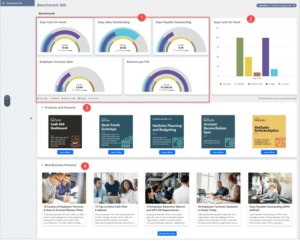
Number 6 – Benchmark 360 SuiteApp:
Benchmark 360 is a new SuiteApp that provides industry benchmarks for key performance indicators (KPIs), helping businesses measure and compare their performance against similar companies within the same industry and region.
Key Features:
- Industry Benchmarking
Allows businesses to compare their performance with similar companies, offering insights into their market position.
- Customisable Performance Metrics
Features a dashboard with five KPIs (e.g., days cash on hand, revenue per full-time equivalent) and allows setting target values aligned with industry standards.
- Discover New NetSuite Products
Displays NetSuite products and features used by similar businesses, suggesting tools that could enhance operations.
Benchmark 360 empowers companies to improve performance through relevant industry insights and encourages the adoption of NetSuite’s best practices.
Number 5 – SuiteBilling Enhancements:
The latest SuiteBilling update enhances subscription management with several key improvements:
- Prepaid Usage with Monthly Consumption
Customers can prepay a set amount for services, with usage deducted from the prepaid balance. Additional prepayments or pay-as-you-go options are available once the balance is exhausted.
- Subscription Flexibility
Businesses can now create custom subscriptions without needing a basic plan or price book, offering greater flexibility, including searching subscriptions by price book.
- Automated Customer Alerts
New automated email alerts notify customers of subscription changes, eliminating manual workflows.
These updates enhance the versatility of SuiteBilling, making it more efficient for complex billing scenarios and improving customer communication and subscription management.
Number 4 – Supply Planning Enhancements:
The 2024.2 release enhances the Supply Planning module with new features that improve planning efficiency and flexibility:
- Simplified Transaction Management
Users can now remove problematic transactions directly without a full system refresh, making issue resolution quicker.
- Flexible Minimum Order Quantities
Minimum order quantities can now be handled with any lot size, adding flexibility to supply planning.
- Extended Planning Horizons
The planning horizon and lead times have been extended from one year to almost ten years, allowing for more advanced long-term planning.
These enhancements streamline complex supply chain management and improve the module’s overall efficiency.
Number 3 – WMS Enhancements:
Additionally, the Warehouse Management System(WMS) in NetSuite has received significant enhancements to optimise warehouse operations:
- Mobile Inventory Management
Users can now create inventory count plans ad manage cycle counting directly from the mobile app, allowing counts for up to ten items, and automatic submission for approval.
- Bin Replenishment Scheduling
Users can set up and manage bin replenishment schedules within NetSuite, including frequency and timing, with notifications for successful or failed runs. Replenishment tasks are accessible on the mobile app.
- Auto-Generate Lot Numbers
Lot numbers can now be automatically generated during the assembly build process on the mobile app, streamlining lot numbering in work orders.
These updates enhance warehouse efficiency by improving inventory management, replenishment, and order fulfilment capabilities.
Number 2 – NetSuite Customer 360:
NetSuite Customer 360 is a powerful new feature that provides a comprehensive view of customer information on a single page.
Key Features:
- Unified Customer View
Aggregates data from various sources to present a complete picture of each customer.
- Historical Sales Data and Recommendations
Provides insights into past sales and suggests product recommendations, making it easier to identify cross-selling and upselling opportunities.
- Enhanced Reporting
Simplifies tracking and reporting on customer sales activities, whether from a CRM or accounting perspective, improving customer relationship management and analysis.
NetSuite Customer 360 enhances visibility into customer interactions and financials, allowing for more informed decision-making and better-targeted marketing strategies.
Number 1 – New User License Types:
NetSuite has introduced two key new licenses:
CRM Licenses
Manage CRM functions like campaigns, opportunities, quotes, sales orders, cases, and CPQ features. They offer customisable permissions but exclude invoicing capabilities.
View and Approve Licenses
Allow users to view and approve transactions, invoices, and reports, with customisation options to restrict access to specific subsidiaries or departments. Users can only view and approve, not perform other actions.
Implementation and Costs
- Existing customers can add new licenses immediately but may need to wait until contract renewal to switch completely.
- Pricing details for these licenses will be available soon; customers should contact their account manager for specific guidance.
These new licenses offer more tailored access to NetSuite, enhancing operational efficiency.
What’s next?:
We hope you start to benefit from these features over the coming months. If you’re a NetSuite user but suspect there is more potential within the system, we’d be happy to discuss your options.
Alternatively, if you find yourself currently utilising a legacy system and see the potential benefits of adopting NetSuite with its semi-annual updates, we encourage you to reach out.
For further details, please feel free to get in touch with Richard Christie, our Business Systems Specialist, at 01355 581960 or via email at richard.christie@eurekasolutions.co.uk
