Reporting is at the heart of effective business intelligence – and Sage 200 offers a powerful suite of tools to help you make smarter, faster decisions. In a recent customer webinar, Rob Coates, our experienced Implementation Team Leader, guided users through the core reporting functionality of Sage 200 and how to get the most from it, from standard tools like Report Designer and Excel Reporting to advanced options like Workspaces and Sage 200 BI.
Whether you’re new to Sage 200 or a seasoned user, this blog distils Rob’s practical walkthrough into an actionable guide.
Meet the Expert
With over 35 years of experience implementing finance and ERP systems, Rob Coates brings deep domain expertise from both Sage business partner and end-user companies. He has specialised in Sage 200 since 2008 and understands the real-world needs of businesses from both sides of the fence. His specialties include Sage 200 Financials, Commercials, BOM, Manufacturing, and Project Accounting.
Reporting Options in Sage 200
The core reporting tools discussed include:
Standard Native Reports
Sage 200 Report Designer
Excel Reporting
Workspaces
Sage 200 BI
Let’s take a closer look at each and explore practical use cases.
Standard Native Reports
Sage 200 comes equipped with a wide range of standard native reports, offering an essential starting point for your business reporting needs.
These out-of-the-box reports are built directly into the system and are readily accessible from key modules such as Sales Ledger, Purchase Ledger, Nominal Ledger, Stock Control, and others. They cover commonly used reports including Aged Debtors, Trial Balance, Audit Trail, Stock Valuations, and VAT Returns—giving you fast access to core financial and operational data.
While these reports are vital for day-to-day tasks and compliance, they represent just the baseline of what Sage 200 can do. Their structure is fixed, and while some minor filtering is possible, the level of flexibility is limited.
That’s why it’s important to recognise these standard reports not as the end, but as the beginning of your reporting journey.
Sage 200 Report Designer
Report Designer: Customise to Fit Your Business
Sage 200’s built-in Report Designer allows you to modify and build reports tailored to your needs. It’s used for everything from financial statements to customer statements and even stock labels.
One standout example Rob shared was a custom Aged Debtors Report by Sales Rep. This kind of report is particularly useful for businesses that involve sales teams in debt collection or want to measure sales rep performance.
By grouping data using Analysis Codes (e.g. account manager, region), Rob showed how to:
Copy and customise a standard report
Group and subtotal data by rep
Export data for pivot table analysis in Excel
Distribute reports digitally (PDF, Excel, email)
This kind of customisation can be set up during your initial implementation—with templates and logic like Report Category 04 driving summaries (e.g. Plant & Machinery within Fixed Assets).
Structured Financial Reporting – No More VLOOKUPs
Many users still export trial balances to Excel and manually manipulate data to create financial reports. Rob emphasised that Sage 200 already includes structured Profit & Loss and Balance Sheet templates—no need for messy VLOOKUP formulas.
These templates reference report categories assigned to nominal codes. For example:
Report category 04 = Plant and Machinery
Grouped under Fixed Assets with subtotals
Automatically summarised in P&L and Balance Sheet reports
Even better, multiple definitions can be created—e.g. detailed P&L vs. P&L with budget—allowing you to generate management reports at the click of a button.
Excel Reporting
For users who love Excel, Sage 200 includes a powerful Excel Reporting suite. As long as the correct structure (i.e. indented P&L/BS hierarchy) is created, you can:
Refresh reports at the click of a button
Present data in clean, tabular Excel views
Filter by year, period, rep, region, etc.
Easily distribute or save as needed
Example Reports:
Profit & Loss in Excel – Refreshable, formatted, branded
Customer Turnover by Period – Filter by year, sales rep, or customer
Out-of-the-Box – These reports are downloadable from your My Sage portal (if subscribed to Sage 200 Services Extra)
Workspaces
Workspaces offer a dynamic, real-time view of your data without requiring complex navigation or report generation. They’re particularly helpful for traceability and product recalls.
Example:
Say you need to identify which customers received goods tied to a specific batch number. Instead of running and filtering multiple reports:
Go to Traceable Items Workspace
Filter by batch number (e.g. BGE00001)
Instantly see where it was issued or sold
Export directly to Excel and share
Workspaces allow you to drill down without losing context. Each view can show linked tables like stock balances, issues, or customer orders.
Sage 200 BI: Built in Dashboards for Deeper Insights
Sage 200 BI (Business Intelligence) is an Excel-based analysis tool using Microsoft SQL Server Analysis Services. It extracts data into a separate data warehouse—avoiding load on your live system—and allows for fast, flexible slicing of your data.
Available BI Packs Include:
Financials (Nominal, P&L, Balance Sheet)
Sales and Customer Profitability
Supplier and Purchase Analysis
Stock and Project Reporting
Example: View your Top 10 Customers by Sales Value for a selected period – fully refreshable in Excel.
Support: We’ve Got You Covered
All of these tools and capabilities can be configured by us at Eureka Solutions. For example:
P&L and Balance Sheet structures
Custom reports using Report Designer
Loading Excel reports from your Sage portal
If you don’t see these tools in your Sage 200 menus, talk to your Account Manager. Often, they’re available but not enabled for your user role.
And if something you need doesn’t exist out of the box? We can help you:
Find it
Modify it
Train you to build it
Or build it for you
Reporting in Sage 200 doesn’t need to be complicated. With a clear understanding of the tools available—and some upfront configuration—you can deliver meaningful insights to your team faster, more clearly, and without the manual overhead.
Need Help?
Contact your Account Manager
Raise a support ticket
Or reach out directly to Rob Coates on 01355 581960
We’re here to help you unlock the full potential of Sage 200 reporting.
Watch the Webinar
If you’d like to dive deeper into the functionality of Sage 200’s reporting capabilities, we highly recommend watching the full on-demand webinar here.
NetSuite is packed with powerful reporting tools – but with so many options, it’s easy to overlook some of the features that could transform the way your business views and uses data. Whether you’re a long-time user, just getting started, or evaluating NetSuite as your next ERP, understanding these tools can help you uncover insights, improve efficiency, and drive smarter decision-making.
Why NetSuite Reporting Matters
Data is one of your most valuable assets – but it’s only useful when it can be accessed, understood, and acted upon. Effective reporting helps you:
Track performance in real-time
Identify trends and outliers
Inform budgeting and forecasting
Improve compliance and audit readiness
Empower departments with self-serve analytics
With the right reporting tools, you can replace manual spreadsheets, reduce errors, and respond to changes faster.
In our recent webinar, we walked through the full spectrum of NetSuite’s reporting capabilities, from out-of-the-box features to advanced tools and third-party integrations. Here’s a deep dive into what’s available and how you can make the most of it.
Out-of-the-Box Reporting Tools
NetSuite provides a solid reporting functionality available to every customer. For some that may be enough functionality.
Financial Reports
NetSuite includes pre-built financial statements – such as Profit & Loss, Balance Sheet, Budget vs Actual, and Cash Flow – that you can customise to fit your business. For example, you might create:
A detailed P&L for internal use with department-level granularity
A simplified, statutory version for external stakeholders
Multiple versions in different currencies for multinational teams
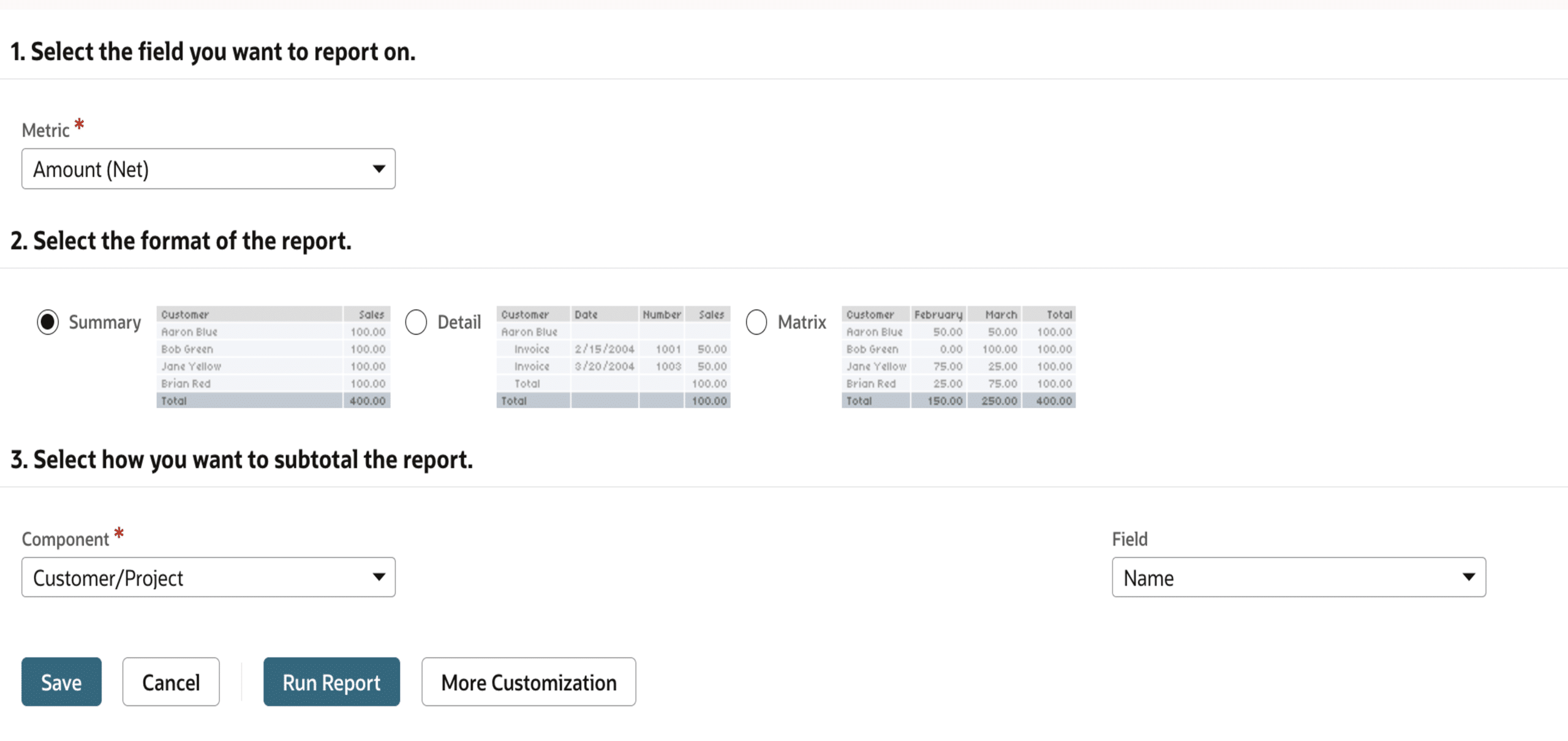
Matrix, Summary & Detailed Reports
Use matrix reports to analyse performance across dimensions like class, location, or time period. Summary reports provide aggregated data, while detailed reports allow you to drill down to individual transactions.
A good use case: A CFO might use a matrix report to compare regional sales performance year-over-year, then drill into underperforming areas to investigate causes.
Multibook Reporting (OneWorld Only)
If your company operates under multiple accounting standards (e.g. IFRS, US GAAP), multibook reporting is a game-changer. It supports parallel reporting, so the same financial transaction can be recorded and reported in different ways. Each approach can follow a different accounting principle or requirement, without having to duplicate the work. This is essential for global finance teams.
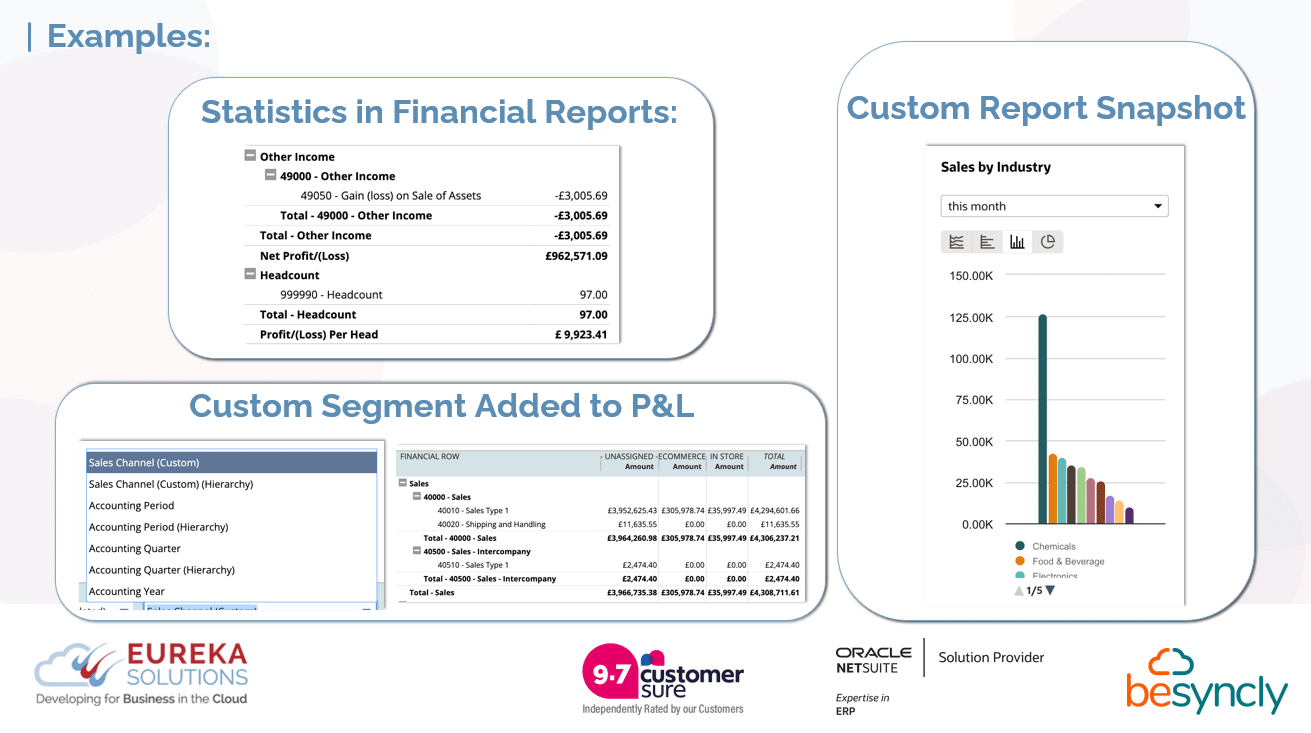
Statistical Accounts
These accounts enable you to track non-financial metrics – such as headcount, square footage, or machine hours – and incorporate them into financial KPIs. For example, you might calculate revenue per employee or energy cost per unit produced.
Saved Searches:
Saved Searches are a versatile and often underutilised reporting powerhouse. They’re more than just filtered lists – they’re a foundation for:
Real-time dashboards
Automated alerts (e.g. overdue invoices)
Scheduled reports delivered via email
Data exports and summaries
You can even build conditional logic and formulas into your Saved Searches. For instance, you might highlight deals closing this week in green and overdue leads in red. They’re also a great way to build audit trails or power exception reporting, such as finding transactions missing a required field.
Scorecards
Scorecards let you monitor KPIs over time, using rolling periods, custom ratios, and historical comparisons. This is especially useful for performance reviews, revenue growth tracking, or monthly board meetings.
Advanced Reporting Options
As your data requirements evolve, so too does the range of advanced modules available within the Oracle ecosystem.
SuiteAnalytics Connect (ODBC)
ODBC (Open Database Connectivity) gives you read-only access to NetSuite data from external platforms like Power BI, Tableau, SQL Server, or Excel. It’s perfect for:
Building board packs in Excel with live NetSuite data
Creating backup extracts for compliance
Sharing reports with auditors or external stakeholders
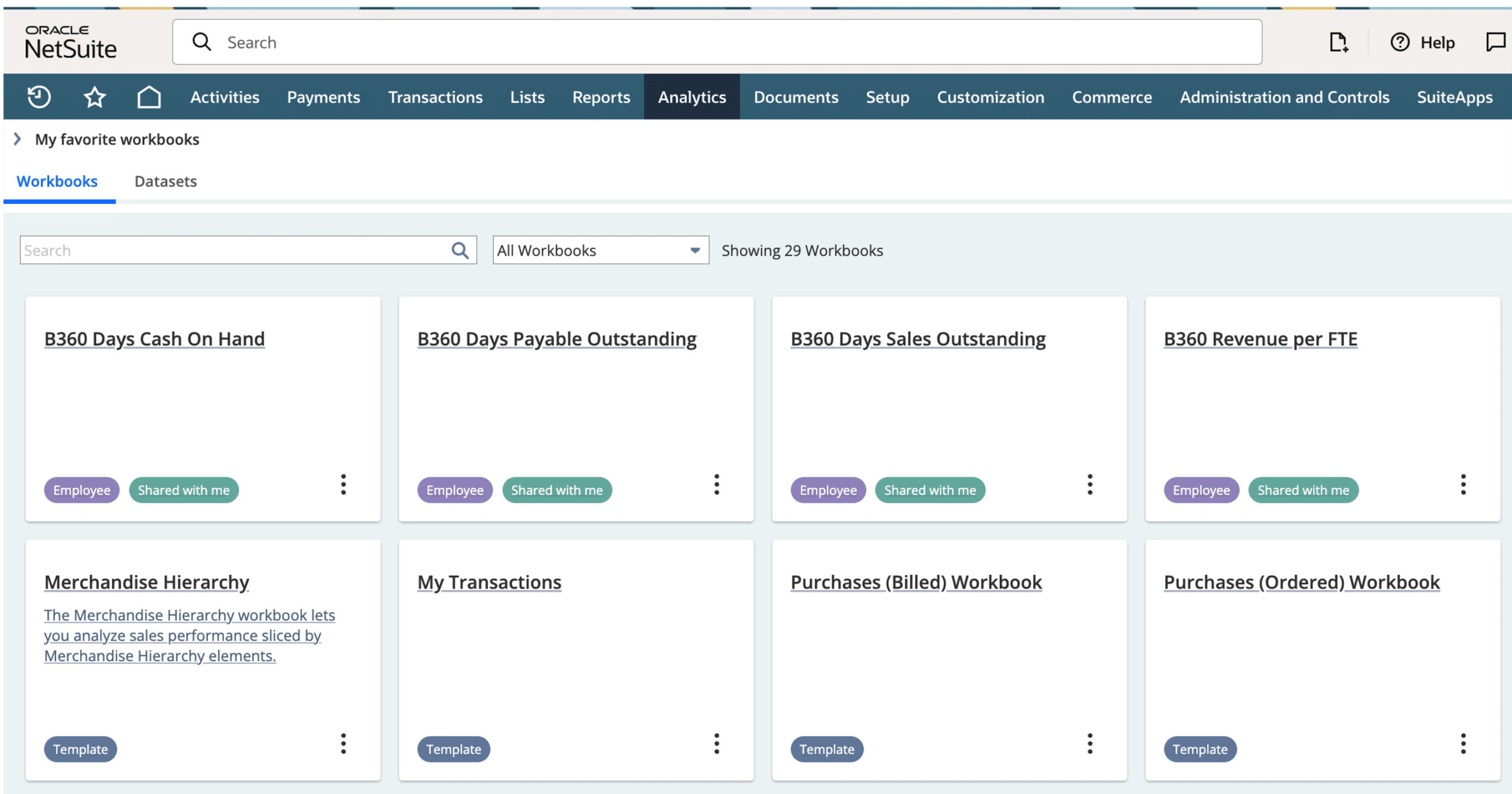
SuiteAnalytics Workbooks
Workbooks provide a more modern, interactive reporting experience. With drag-and-drop tools and pivot-style analysis, they’re ideal for users who want deeper insights without relying on IT or external tools.
Key benefits:
Combine multiple data sets
Create custom charts and visualisations
Embed reports into dashboards
Share insights securely across teams
For example, marketing can analyse campaign ROI, while finance can build a profitability analysis across products and time periods.
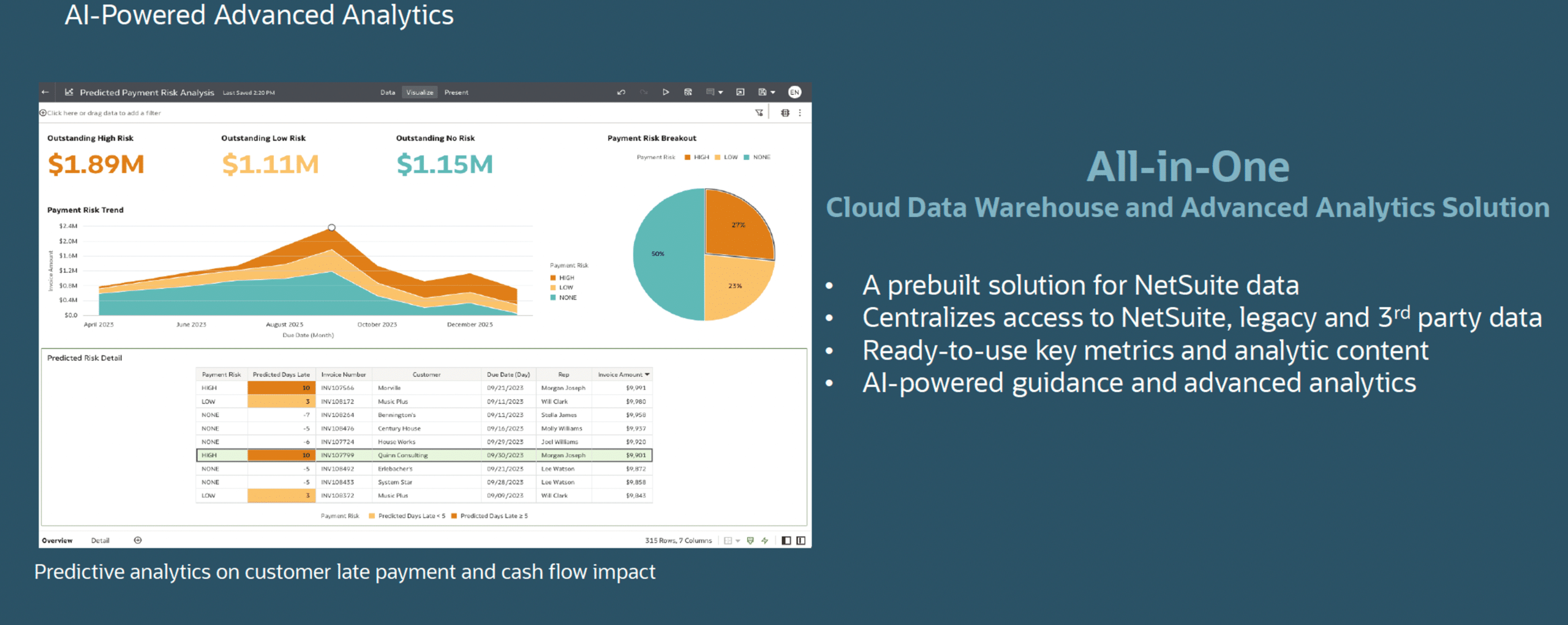
NetSuite Analytics Warehouse (NSAW)
NSAW is a cloud-based business intelligence and data warehousing solution that enables deeper analysis, advanced visualisations, and AI-driven insights – not just from NetSuite, but from multiple data sources across your organisation (e.g. Salesforce, Google Ads).
It includes:
AI-driven insights and predictive analytics
Pre-built dashboards for NetSuite modules
Cross-platform data consolidation (e.g. merging CRM and ERP data)
Use it to forecast customer churn, model revenue, or analyse historical trends – all with Oracle-grade security and performance.
Enterprise Performance Management (EPM)
NetSuite EPM tools help you manage your financial planning and close processes in a single platform. Key modules include:
NetSuite Planning and Budgeting (NSPB) – Replaces Excel-based planning with centralised collaboration and AI-driven forecasting.
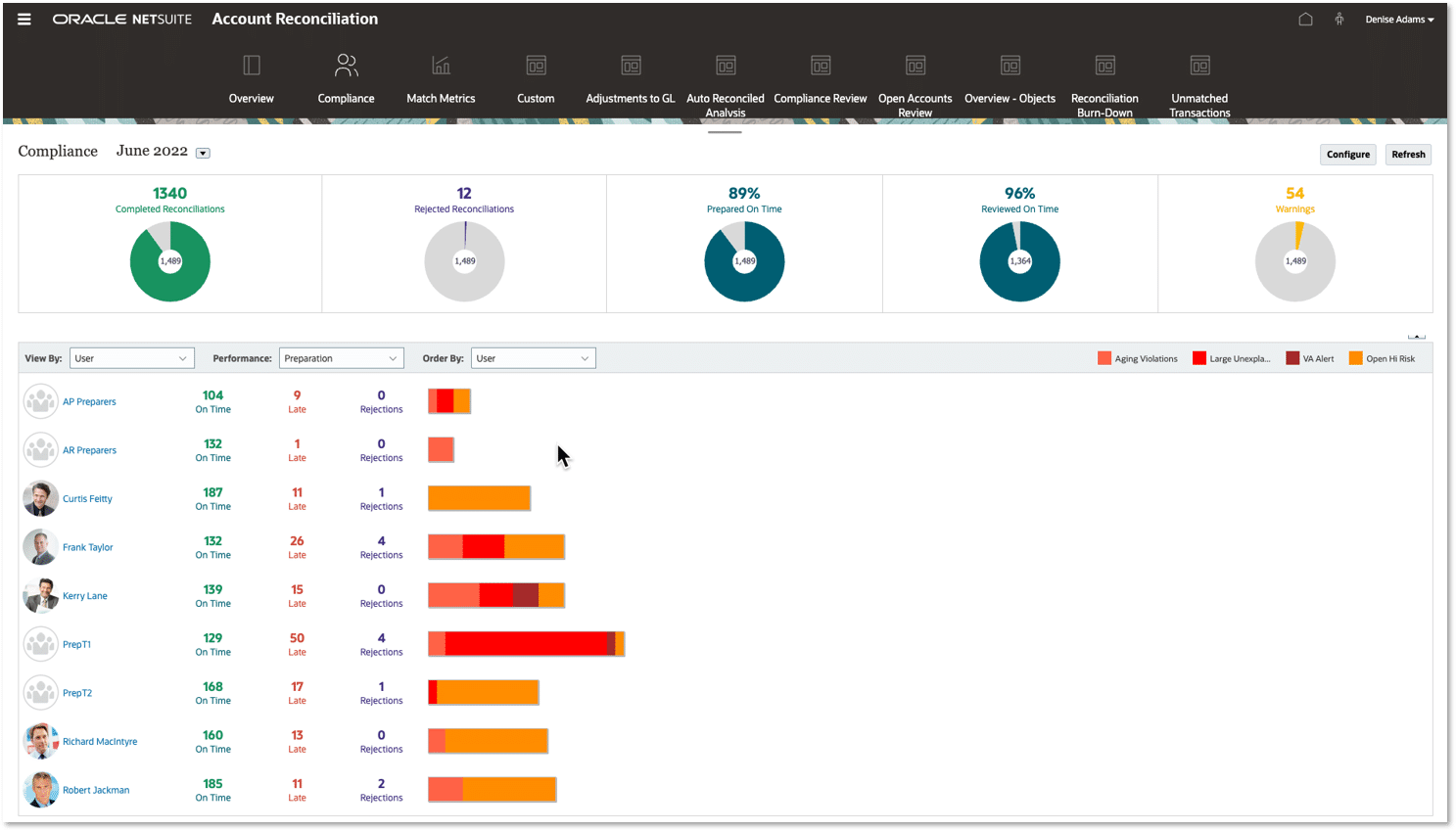
Account Reconciliation – Improves the month-end close and reduces manual errors.
These tools offer natural language summaries, predictive modelling, and customisable workflows.
Third-Party Reporting Tools
When native tools aren’t quite enough, the NetSuite ecosystem offers powerful integrations:
Solution 7 – A NetSuite SuiteApp that provides two-way integration between NetSuite and Excel, helping you create flexible budgeting and forecasting models that can be personalised for each individual budget holder, emailed and quickly loaded into NetSuite with just a few simple clicks.
ZoneReporting – Built on Power BI, with plug-and-play, customisable dashboards and visualisations, providing real-time insights into various business operations, including finance, sales, operations, and supply chain management.
Tactical Connect – Data connector for external reporting tools/data extract, which doesn’t require ODBC.
These options can extend reporting to meet very specific or niche business requirements – particularly for enterprise-scale environments or teams with established tool preferences.
Training & Support Resources
No matter your reporting goals, there’s help available:
Learning Cloud Support Pass (LCSP) – On-demand training modules for all levels.
NetSuite Help Center – In-depth documentation and how-to guides.
Customised Training – Work directly with Eureka Solutions to build dashboards and reports tailored to your business.
With NetSuite’s comprehensive reporting toolkit, you’re never more than a few clicks away from real-time insights. Whether you’re managing daily operations or forecasting for the year ahead, having the right data at your fingertips is a competitive advantage.
From the basics like financial reports and Saved Searches to cutting-edge tools like NSAW and EPM, there’s a reporting path for every business and every user.
For a deeper dive into everything we’ve covered, be sure to watch the full webinar.
Additionally, if you have any questions or would like guidance tailored to your business’ reporting needs, feel free to get in touch – we’re here to help.
With 48% of CFOs ranking efficiency and productivity as their top internal risk—even more than strategy execution, AI adoption, and hiring and retention—the NetSuite 2025.1 release promises process boosts that enable you to work smarter and do more with less.
Delivering improved AI capabilities, more automation, and an even greater degree of financial management, you’ll enjoy slicker operational workflows and achieve better efficiency than ever before.
As we continue to support our NetSuite clients in getting the best from their system, we turned to Rory Munro, our expert NetSuite Solution Consultant, to share his Top 10 features from the release.
1. Bill Capture (UK Customers)
A major update for UK customers, Bill Capture’s invoice-scanning solution is now available for those using SuiteTax. Streamlining supplier bill processing, it uses automation to reduce manual data entry, speed up approvals, and detect duplicates. By enabling this in your system, you can enjoy:
Increased Accuracy: Automation reduces errors in manually re-keying invoice information, improving overall data accuracy.
Faster Invoice Approvals: Bill Capture accelerates the invoice approval process, benefiting your accounts payable department.
Already enhanced thanks to feedback from users elsewhere, UK customers can take advantage of this release’s improvements to usability and traceability for an even more effective solution.
2. Embedded AI Enhancements
As NetSuite themselves say, they are ‘infusing AI into everything we do to help our customers get even more out of the suite.’
With this update, the embedded AI capabilities are more powerful than ever, and offer these features:
Narrative Reporting: For customers using EPM, AI-generated narratives and explanations of both financial and transactional data show trends, variances and comparisons, saving you time in preparing reports.
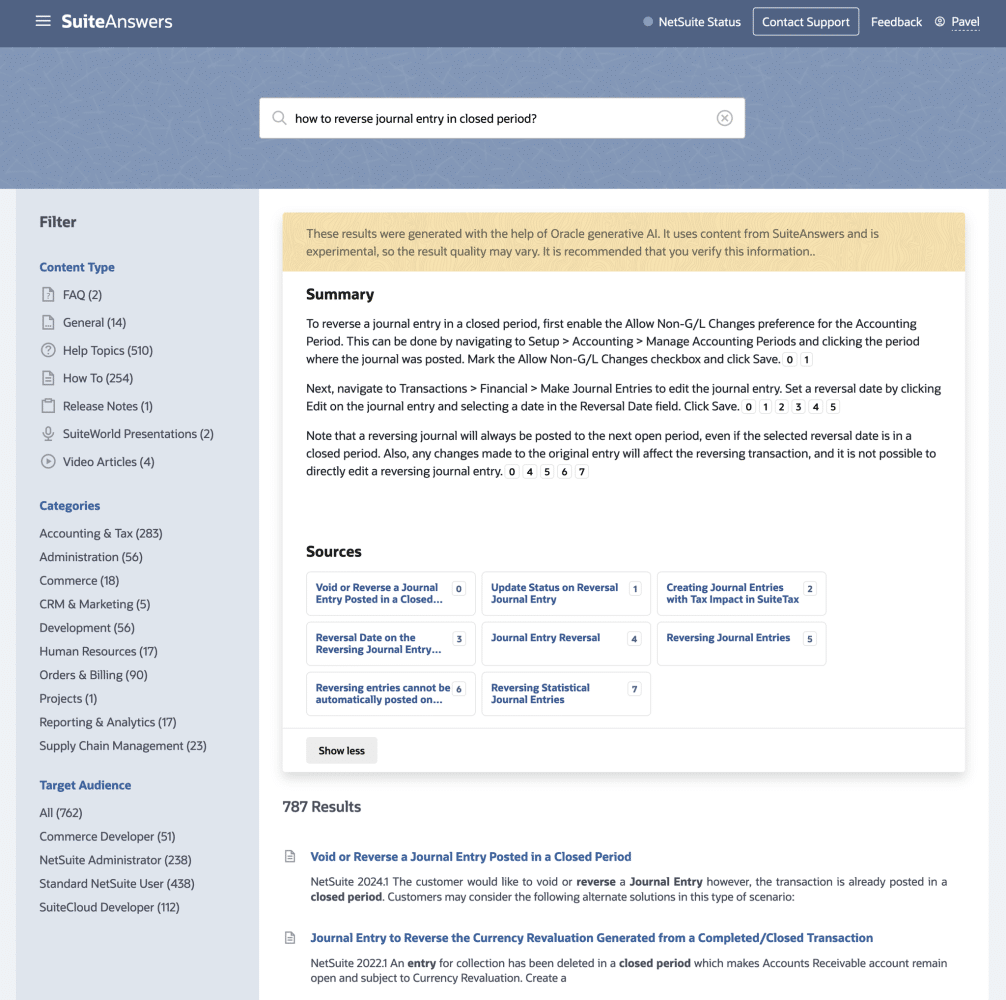
Enhanced SuiteAnswers AI: Using Oracle Cloud Infrastructure (OCI) to deliver powerful capabilities, NetSuite Expert for SuiteAnswers provides smarter, more specific responses, helping you find what you need faster and without having to access multiple documents.
AI-Based Text Enhancements: New tools, like Prompt Studio and AI Preference Updates, further improve your NetSuite experience by personalising responses to both your preferences and the context of the request.
3. New Import Capabilities
NetSuite now supports additional CSV import record types, including:
Item Receipts
Item Fulfilments
This expansion streamlines data import processes, making it easier to manage your records directly from CSV files.
4. SuiteBilling Enhancements
The SuiteBilling module sees several key improvements designed to refine subscription billing processes and increase precision in financial tracking.
New features include:
Annual Recurring Revenue (ARR) Analytics & Dashboard: Add ARR tracking to your existing MRR reports for deeper insight.
Invoice & Allocate Before Activation: Bill for hardware and services even before software activation.
Pooled Usage Pricing: Bill monthly, but price annually for more flexible pricing models.
Higher Decimal Precision for Uplift Pricing: Improve the accuracy of percentage-based price increases with enhanced decimal precision.
5. Customer 360 Enhancements
These updates combine financial, transaction history and all interactions into a single dashboard, providing a holistic view of each customer, leading to better insights, better decision making and better customer service.
Expanded Recent Activities: Now track more transaction types, including purchase orders, refunds, and work orders.
Sales Performance Metrics: Compare sales this year vs. last year, and track customer lifetime value.
New Opportunities & Estimates Tab: Track projected and weighted totals, plus opportunities won for better forecasting.
New Orders & Returns Tab: Filter orders by type/status for more granular tracking.
6. Redwood UI Enhancements
More than just good looks, the Redwood User Interface continues to evolve, for a cleaner, more intuitive, user experience:
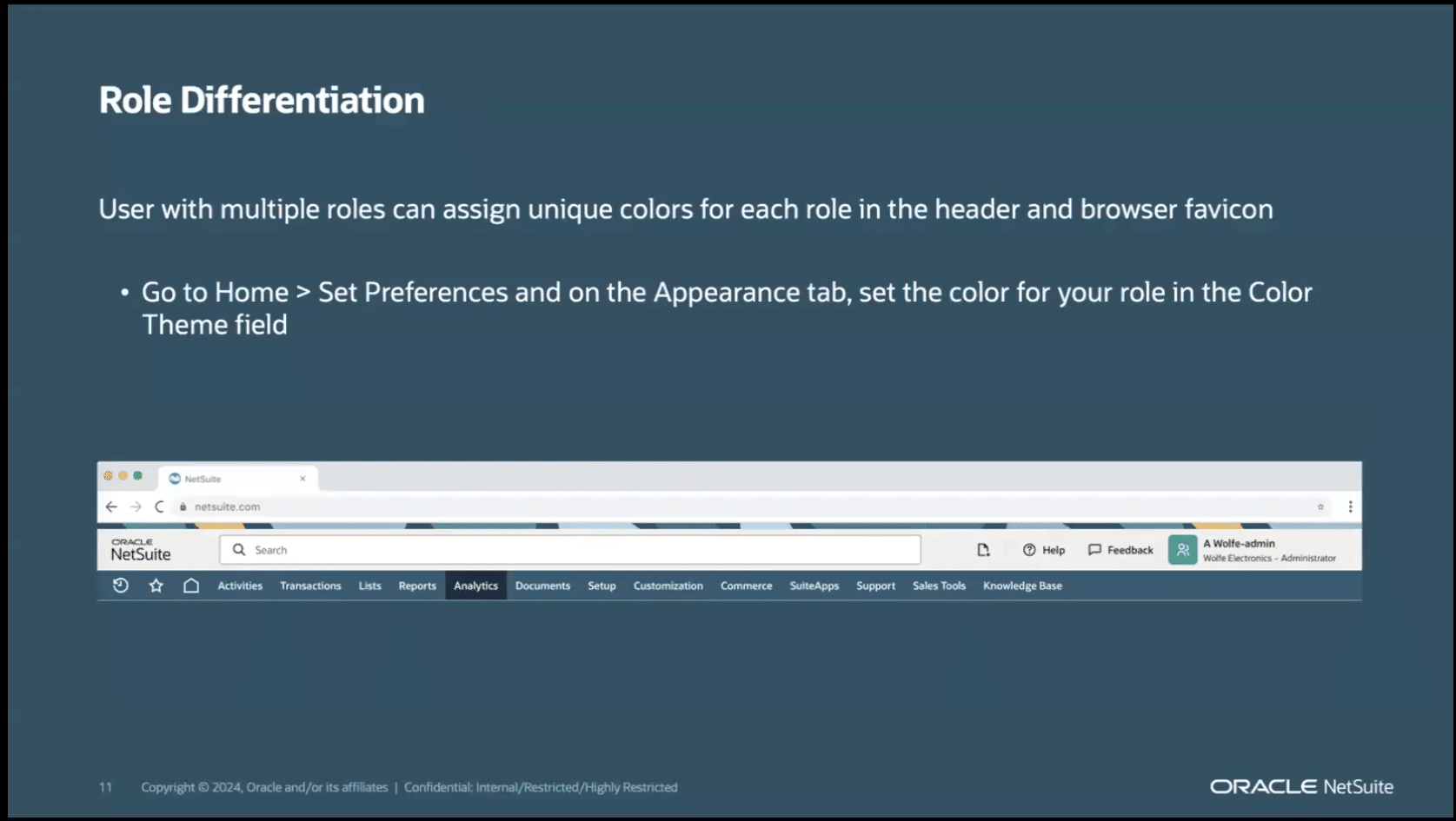
Additional Colour Themes: New options to personalise the interface to match your preferences.
Activity-Based Recommendations: Receive helpful messages based on your activity within NetSuite. For example, the enhanced Customer 360 dashboard includes an AI-powered Item Recommendation portlet, offering personalised product suggestions to users.
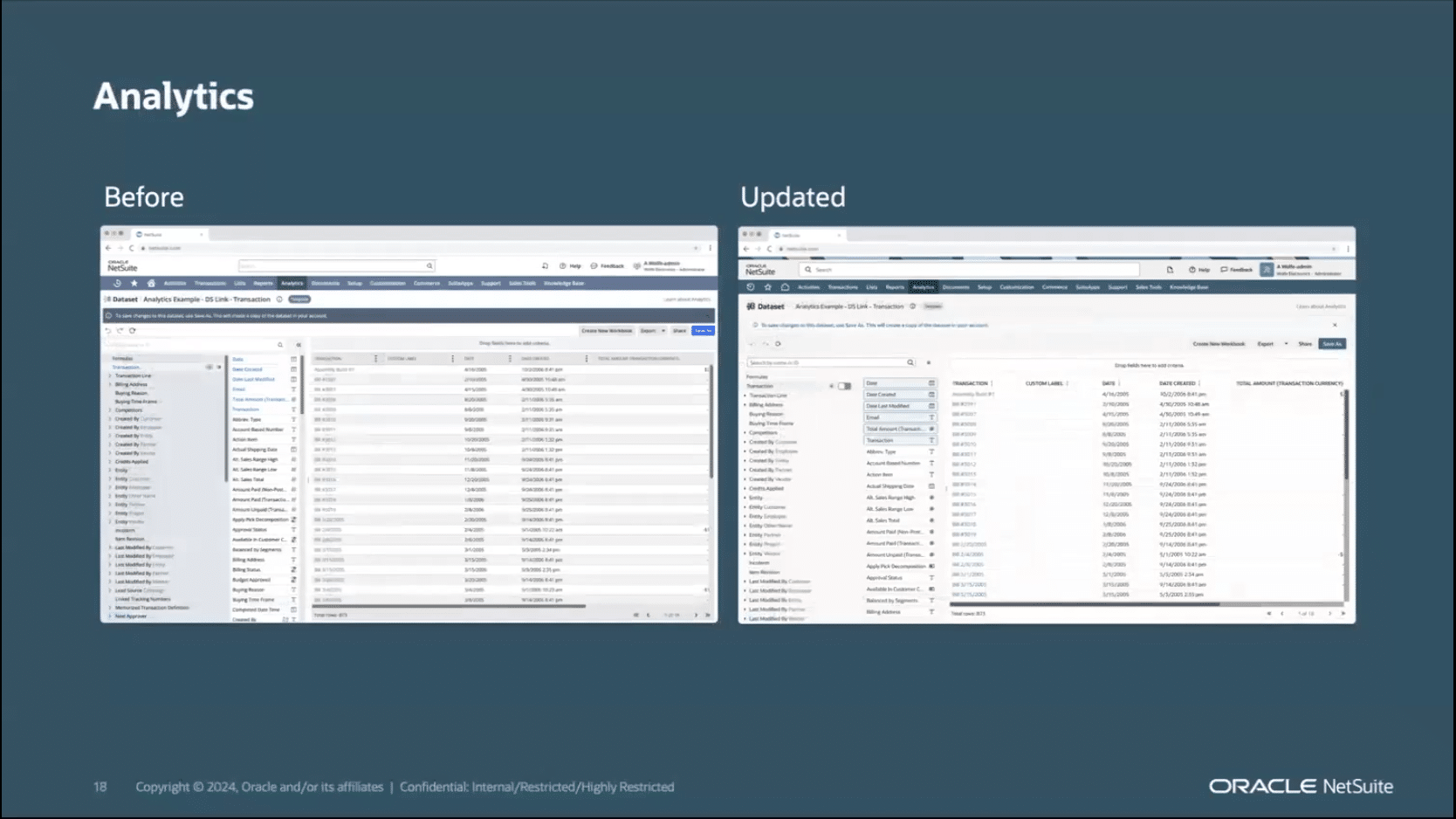
Expansion to More Features: More NetSuite pages, portlets, and features are now supported in the updated UI design.
7. SuiteAnalytics Enhancements
NetSuite continues to improve data access and reporting capabilities with:
Individual Report Distribution: Reports can now be sent to individuals, replacing the previous group-wide email approach.
New HTML Formulas in Search Features: Enhanced customisation and security for saved searches, offering more control over reporting.
8. Fixed Asset Management Enhancements
Updates to the Fixed Asset Management module make it more user-friendly and efficient, including:
Redesigned System Setup Page for Redwood UI: A refreshed setup page that enhances usability.
Mid-Life Leases Support: Now users can enter leases initiated outside of NetSuite, improving flexibility in lease management and ensuring no duplication during import.
9. Supplier Filter on Supply Planning Workbench
Supply chain management just got easier with an added filter on the Supply Planning Workbench:
Supplier Filtering Option: Filter planning results by supplier, improving visibility and decision-making throughout the supply chain.
10. Quality Management Enhancements
The Quality Management module now includes powerful updates to streamline your quality processes:
New Statistical Sampling Feature: Target inspections based on item, volume, or transaction type for more efficient checks.
Improved Return Authorisation Workflow: Automatically generate return authorisations for non-compliant items found during quality checks.
Process & Visibility Enhancements: Access inventory details directly from inspection queues for better tracking and decision-making.
What’s next?
The NetSuite 2025.1 release will be deployed from February to April, with the bi-annual software updates providing the latest features, enhancements, and security improvements.
These regular updates provide NetSuite users with a disruption-free way of enabling new technologies being built into the platform, so they can keep business ticking along – one of the true benefits of choosing a cloud-based ERP.
We hope you start to benefit from these features over the coming months. If you think there’s more you can get from your system, we’d love to discuss your options.
Alternatively, if you find yourself currently using a legacy system and see the potential benefits of adopting NetSuite with its semi-annual updates, we encourage you to reach out.
For further details, please feel free to get in touch with Richard Christie, our Business Systems Specialist, at 01355581960 or via email at richard.christie@eurekasolutions.co.uk
At Eureka Solutions, we’ve been delivering and implementing business software solutions for over 20 years. This experience has given us a deep understanding of the evolving needs of businesses, particularly those seeking finance systems that balance functionality, affordability, and scalability.
In 2023, we made the strategic decision to partner with iplicit, driven by our confidence in their solution—a product we believe has transformed the options available to mid-market companies.
More than a year on, we remain thrilled with both the software capabilities and the partnership itself. In this blog, we’ll share why we chose iplicit and the impact it has had on our customers and business.
Recognising a gap in the market
As a trusted provider of solutions such as NetSuite and Sage 200, we’ve observed firsthand the challenges businesses face as they grow at pace. Many outgrow entry-level finance systems, yet are reluctant to change to larger ERP solutions due to prohibitive costs and lengthy implementation periods.
We identified a clear gap in the market: mid-sized organisations needed a financial management system that was powerful yet accessible, scalable but not overwhelming. That’s when iplicit caught our attention – a solution designed to help businesses seamlessly bridge this gap.
Bridging the gap to the ideal solution
From the outset, iplicit impressed us with its innovative approach.
Affordability with Advanced Features: Our Commercial Director, Alan Miles, explains, “We were blown away by the functionality iplicit offered at its price point. Features like purchasing, fixed assets, project accounting, and fund reporting are all included in a straightforward, affordable package.” Additionally, iplicit’s advanced automation capabilities and commitment to efficiency proved to be a game-changer, enabling businesses to streamline operations, reduce manual workloads, and significantly enhance overall productivity.
Speed of implementation: Unlike traditional ERP systems that take several months to roll out, iplicit implementations can be completed in just a few weeks. This enables businesses to see immediate results, minimising disruption and maximising value. “With larger ERP solutions, it can take 50-100 days to implement” says David Lindores, CEO at Eureka Solutions. “Whereas, you can implement iplicit in 15-20 days—customers can get up and running in an incredibly short time.”
Partner-Centric Support: iplicit’s commitment to its partner network stood out. From pre-sales assistance to technical training, the team ensured we had the tools and knowledge to deliver exceptional results for our customers. “Thanks to this support, we have now delivered many iplicit implementation projects and have even helped iplicit when they reach capcity”says David.
Enhancing iplicit with Besyncly
As well as iplicit’s excellent product and support, we also spotted an opportunity to help iplicit customers connect their finance systems with wider business systems using our in-house integration platform, Besyncly.
Besyncly is a sophisticated, cloud-based integration solution designed to seamlessly connect and exchange data across your organisation.
As our CEO David explains, “Besyncly is an API-driven platform that allows us to create connectors for any system or platform with a cloud-based API so that our customers can seamlessly connect all their business systems. It acts as a bridge between systems, synchronising data to create a smooth and uninterrupted flow of information, removing the need for manual processes.”
Customers who have integrated iplicit using Besyncly now enjoy accurate and secure transmission of critical data—such as sales orders, purchase orders, payments, contacts, and more—between various business applications. These include ecommerce platforms, CRM systems, ticketing solutions, fundraising systems, recruitment tools, and many others, ensuring improved operational efficiency, precise data handling, and enhanced security for their organisations.
By developing a Besyncly connector for iplicit, we aim to ensure that every iplicit customer can enjoy seamlessly integrated business systems.
A Buzz of Excitement
More than a year into the partnership, we’re as enthusiastic as ever about iplicit. The feedback from our team and customers has been overwhelmingly positive. Our Commercial Director, Alan Miles sums it up perfectly, “There’s a buzz of energy around iplicit, and the enthusiasm within our team and among the businesses we’ve implemented it for is contagious.”
The Road Ahead
We see enormous potential for iplicit, particularly in industries like nonprofit, education, and technology, where its feature set and price point are especially well-suited.
As cloud adoption continues to grow, we believe iplicit is positioned to become the go-to solution for scaling mid-market businesses. Alan Miles highlights the opportunity: “The number of businesses that could benefit from iplicit is considerable. Many are on legacy systems and will need to look to the cloud. They’re growing, becoming more complex in terms of their offering, and will need to move to the next level of finance system.”
CEO David Lindores emphasises, “Both businesses care deeply about getting the right solution for their customers.” This sentiment perfectly aligns with our mission to guide clients toward tailored solutions that meet their unique needs. It also reflects the confidence we have in iplicit as a partner that shares our values and unwavering commitment to delivering exceptional results.
We look forward to continuing this journey together and helping even more businesses thrive with iplicit and Besyncly at their side.
Typically, Sage releases two updates each year, with R1 arriving in February and R2 in August. However, this year marks a shift, as the 2024 R2 release has been launched this month.
Each new release from Sage is built using customer feedback to improve the software’s performance, add new features, and enhance the user experience.
So, let’s look at some of the new features found in the Sage 200 Professional 2024 R2 release.
Bank Transaction Import
If your bank doesn’t support direct download of bank feeds, you can now import bank transactions in bulk from a file.
This new feature removes the need to manually type each individual transaction into Sage, enhancing data accuracy and timeliness, while helping teams better manage cash flow, monitor financial status, and quickly identify discrepancies for improved security.
Amend Requested and Promised Dates
Streamline your workflow with the ability to update requested and promised dates across Sales Orders, Quotes (both desktop and web), and Proformas (desktop only). This new feature allows cascading date changes, eliminating the need for manual updates on each line item, saving time and improving efficiency.
This is particularly useful in scenarios where changes to delivery schedules are common, such as in industries with complex supply chains or frequent customer adjustments.
Increased Reference and Second Reference Field Lengths
Addressing the need for longer vendor invoice numbers—such as those from Amazon—this enhancement prevents the abbreviation of important details. It helps minimise errors and ensures data remains clear and accurate.
Why Have the Latest Version of Sage 200?
If you’re thinking that your current Sage 200 solution will be null and void without updating, don’t worry. Your software will continue to run as it should. However, running the latest version of Sage 200 ensures it is fully supported by Sage.
Sage officially supports the four most recent versions of its software. With the release of 2024 R2, support for versions prior to 2022 will be phased out. Therefore, it is worth noting which version of Sage 200 you are running. Without access to support and technical assistance you leave your system vulnerable. Upgrading ensures you remain eligible for Sage’s dedicated support and future updates.
All Eureka Solutions Sage 200 customers continue to be supported by us, despite which version they are on.
With a consistent 9.7/10 customer service rating, our team is dedicated to providing you with a solution to your problem and helping you achieve more with Sage 200.
How to Update Sage 200
If you’re using an older version of Sage 200 and think it might be time to upgrade, it’s best to consult your Sage 200 partner. They’ll be familiar with your system and have the expertise to guide you through a seamless migration process.
If you’d like to check which version you are on, check out this Sage guide.
How Can Eureka Solutions Help?
As a Sage Platinum Partner and five-time winner of the ‘Sage Custom Solutions Partner Award’, Eureka Solutions is one of the most experienced Sage partners in the UK.
We offer several services such as implementation, Sage development and support. So, whether you need some help with your Sage 200 solution or are looking to make the move to Sage 200, don’t hesitate to get in touch.
If you are a current customer of Eureka Solutions and looking to upgrade, simply get in touch with your Account Manager who will get you started.
As your business grows, the tools and systems that once served you well may start to hold you back. What worked for a small, agile team may no longer support the complexity and scale of a larger organisation. Outgrowing your entry-level finance system is a natural part of business evolution, but knowing when to upgrade—and what to upgrade to—is crucial for your continued success.
In this post, we’ll explore the key signs that indicate it’s time for a change and discuss important considerations for selecting a finance system that aligns with your growth goals.
We’ve identified four core areas to focus on when evaluating your current system:
Technical Infrastructure and Moving to the Cloud: Is your system scalable and accessible, or are you bogged down by outdated, on-premises technology?
Streamlining and Automating Manual Processes: Are you still spending valuable time on repetitive tasks that could be automated?
Management Systems and Reporting: Do your current tools provide the insights you need for strategic decision-making?
Ability to Integrate with Existing and Future Business Systems: Can your finance system connect easily with other critical business applications to ensure seamless operations?
By assessing your finance system through these lenses, you can determine whether it’s time to upgrade to a more robust solution that supports your business today and positions you for future growth.
Technical Infrastructure and Transitioning to the Cloud
As businesses grow, their technical infrastructure must evolve to meet increasing demands. A common barrier for many organisations is the transition from an on-premise finance system to a cloud-based solution.
One major concern is the cost associated with upgrading on-premises systems, including purchasing new servers and managing ongoing maintenance. In contrast, while cloud solutions may appear to have higher upfront costs, they can prove cost-effective in the long run.
Data security is another crucial topic. While businesses were once sceptical of cloud security, the perception has shifted significantly. Today, cloud platforms are often viewed as more secure than traditional on-premises setups, offering advanced security features and regular updates that on-premises solutions might lack.
Fear of change can also be a barrier. Migrating systems and ensuring data integrity can seem daunting. However, with experienced professionals and a structured approach, these challenges can be managed smoothly.
Moving to the cloud provides the flexibility, accessibility, and scalability businesses need to thrive in a constantly evolving environment. As your company grows, cloud solutions will position you for future success.
Streamlining and Automating Manual Processes
A key reason for upgrading financial systems is the need to streamline and automate manual processes, boosting efficiency across the business. Many organisations are unaware of how manual their processes are until they explore new solutions. Tasks like purchase approvals and bank reconciliations often involve time-consuming paperwork or email chains. Automating these processes not only saves time but also minimises errors and enhances transparency by ensuring that essential information is no longer confined to a single person’s email inbox.
For instance, automated purchase order approvals replace manual checks, speeding up decisions, while AI-driven bank reconciliation tools read statements and match transactions automatically. Accounts payable automation, where systems extract invoices from emails and generate draft entries, further reduces data entry.
Automation also simplifies recurring transactions, deferred income management, and credit control by sending automatic reminders to clients, streamlining collections without losing the personal touch.
Additionally, automation empowers department heads with real-time visibility into their budgets, allowing finance teams to focus on strategic initiatives and freeing employees from repetitive tasks. This shift enables them to engage in higher-value work that contributes more meaningfully to the organisation, boosting both productivity and job satisfaction. For businesses with multiple entities, automating inter-company transactions and consolidations improves accuracy and speeds up financial reporting.
In short, automation enhances workflows, control, and transparency, making it a vital element of modern financial management.
Management Systems and Reporting
As organisations grow, reporting often becomes a challenge, especially with outdated financial systems. Traditionally, reports like profit and loss statements or balance sheets were printed or exported to Excel for manual manipulation, a process prone to errors and delays.
Modern financial systems are changing this, offering live, real-time, on-screen data that allows leaders to drill down into specifics without manual adjustments. This speeds up decision-making and improves accuracy.
A major issue is the lengthy month-end close process. A recent iplicit survey showed that over 50% of finance professionals take more than 20 days to close. Relying on manual Excel exports worsens delays and increases errors.
Using scalable financial systems with real-time dashboards reduces reliance on finance teams for every report, saving time and democratising access to key business insights, fostering faster, more informed decisions. For industries like non-profits, where specific reports such as fund and grant tracking are essential, modern solutions offer the flexibility to meet requirements, improving compliance and efficiency.
Overall, real-time reporting transforms outdated practices into streamlined processes that drive better, faster decisions.
Ability to Integrate with Existing and Future Business Systems
Many businesses grapple with disconnected systems that don’t communicate effectively, resulting in inefficiencies and fragmented data. This disjointed setup can hinder decision-making and slow down operations. Integration of business systems creates a seamless, unified infrastructure.
A prime example of this is the retail sector, where we’ve seen companies struggle with the rapid shift to online sales, especially during the pandemic. One client in the health and beauty industry faced significant challenges managing data from multiple platforms like WooCommerce and Shopify. Their reliance on manual data entry for order processing led to inefficiencies and errors.
By integrating their Ecommerce systems with their accounting software, through Eureka Solutions’ cloud-based integration platform Besyncly, the entire process was automated, synchronising orders and stock levels in real time. This not only eliminated the need for manual data entry but also improved accuracy and allowed their team to focus on more value-driven tasks.
Modern systems with APIs simplify integration, allowing businesses to connect their best CRM, operational, and finance platforms without overhauling existing systems. This approach creates a unified, efficient ecosystem that boosts productivity and supports data-driven decisions.
Summary
If, after reading this post, you recognise that your business has outgrown its entry-level finance system, it’s time to explore your options. Upgrading to a more robust solution can streamline operations, enhance data visibility, and support your growth ambitions.
We’re here to help you navigate this transition. Get in touch with us today to discuss the best finance system for your organisation’s unique needs. Your next phase of growth starts with the right tools—let’s find them together.
As your business grows, the tools and systems that once served you well may start to hold you back. What worked for a small, agile team may no longer support the complexity and scale of a larger organisation. Outgrowing your entry-level finance system is a natural part of business evolution, but knowing when to upgrade—and what to upgrade to—is crucial for your continued success.
In this post, we’ll explore the key signs that indicate it’s time for a change and discuss important considerations for selecting a finance system that aligns with your growth goals.
We’ve identified four core areas to focus on when evaluating your current system:
Technical Infrastructure and Moving to the Cloud: Is your system scalable and accessible, or are you bogged down by outdated, on-premises technology?
Streamlining and Automating Manual Processes: Are you still spending valuable time on repetitive tasks that could be automated?
Management Systems and Reporting: Do your current tools provide the insights you need for strategic decision-making?
Ability to Integrate with Existing and Future Business Systems: Can your finance system connect easily with other critical business applications to ensure seamless operations?
By assessing your finance system through these lenses, you can determine whether it’s time to upgrade to a more robust solution that supports your business today and positions you for future growth.
Technical Infrastructure and Transitioning to the Cloud
As businesses grow, their technical infrastructure must evolve to meet increasing demands. A common barrier for many organisations is the transition from an on-premise finance system to a cloud-based solution.
One major concern is the cost associated with upgrading on-premises systems, including purchasing new servers and managing ongoing maintenance. In contrast, while cloud solutions may appear to have higher upfront costs, they can prove cost-effective in the long run.
Data security is another crucial topic. While businesses were once sceptical of cloud security, the perception has shifted significantly. Today, cloud platforms are often viewed as more secure than traditional on-premises setups, offering advanced security features and regular updates that on-premises solutions might lack.
Fear of change can also be a barrier. Migrating systems and ensuring data integrity can seem daunting. However, with experienced professionals and a structured approach, these challenges can be managed smoothly.
Moving to the cloud provides the flexibility, accessibility, and scalability businesses need to thrive in a constantly evolving environment. As your company grows, cloud solutions will position you for future success.
Streamlining and Automating Manual Processes
A key reason for upgrading financial systems is the need to streamline and automate manual processes, boosting efficiency across the business. Many organisations are unaware of how manual their processes are until they explore new solutions. Tasks like purchase approvals and bank reconciliations often involve time-consuming paperwork or email chains. Automating these processes not only saves time but also minimises errors and enhances transparency by ensuring that essential information is no longer confined to a single person’s email inbox.
For instance, automated purchase order approvals replace manual checks, speeding up decisions, while AI-driven bank reconciliation tools read statements and match transactions automatically. Accounts payable automation, where systems extract invoices from emails and generate draft entries, further reduces data entry.
Automation also simplifies recurring transactions, deferred income management, and credit control by sending automatic reminders to clients, streamlining collections without losing the personal touch.
Additionally, automation empowers department heads with real-time visibility into their budgets, allowing finance teams to focus on strategic initiatives and freeing employees from repetitive tasks. This shift enables them to engage in higher-value work that contributes more meaningfully to the organisation, boosting both productivity and job satisfaction. For businesses with multiple entities, automating inter-company transactions and consolidations improves accuracy and speeds up financial reporting.
In short, automation enhances workflows, control, and transparency, making it a vital element of modern financial management.
Management Systems and Reporting
As organisations grow, reporting often becomes a challenge, especially with outdated financial systems. Traditionally, reports like profit and loss statements or balance sheets were printed or exported to Excel for manual manipulation, a process prone to errors and delays.
Modern financial systems are changing this, offering live, real-time, on-screen data that allows leaders to drill down into specifics without manual adjustments. This speeds up decision-making and improves accuracy.
A major issue is the lengthy month-end close process. A recent iplicit survey showed that over 50% of finance professionals take more than 20 days to close. Relying on manual Excel exports worsens delays and increases errors.
Using scalable financial systems with real-time dashboards reduces reliance on finance teams for every report, saving time and democratising access to key business insights, fostering faster, more informed decisions. For industries like non-profits, where specific reports such as fund and grant tracking are essential, modern solutions offer the flexibility to meet requirements, improving compliance and efficiency.
Overall, real-time reporting transforms outdated practices into streamlined processes that drive better, faster decisions.
Ability to Integrate with Existing and Future Business Systems
Many businesses grapple with disconnected systems that don’t communicate effectively, resulting in inefficiencies and fragmented data. This disjointed setup can hinder decision-making and slow down operations. Integration of business systems creates a seamless, unified infrastructure.
A prime example of this is the retail sector, where we’ve seen companies struggle with the rapid shift to online sales, especially during the pandemic. One client in the health and beauty industry faced significant challenges managing data from multiple platforms like WooCommerce and Shopify. Their reliance on manual data entry for order processing led to inefficiencies and errors.
By integrating their Ecommerce systems with their accounting software, through Eureka Solutions’ cloud-based integration platform Besyncly, the entire process was automated, synchronising orders and stock levels in real time. This not only eliminated the need for manual data entry but also improved accuracy and allowed their team to focus on more value-driven tasks.
Modern systems with APIs simplify integration, allowing businesses to connect their best CRM, operational, and finance platforms without overhauling existing systems. This approach creates a unified, efficient ecosystem that boosts productivity and supports data-driven decisions.
Summary
If, after reading this post, you recognise that your business has outgrown its entry-level finance system, it’s time to explore your options. Upgrading to a more robust solution can streamline operations, enhance data visibility, and support your growth ambitions.
We’re here to help you navigate this transition. Get in touch with us today to discuss the best finance system for your organisation’s unique needs. Your next phase of growth starts with the right tools—let’s find them together.
It’s that time of year once again. The upcoming NetSuite 2024.2 release is set to be seamlessly deployed from August to October, with a monthly rollout of phases. This approach guarantees that every user can take advantage of each improvement and new feature incorporation without encountering any service disruption.
As we continue to support our NetSuite clients to get the best from their system, we turned to Jack Loudon, our expert NetSuite Solution Consultant to share his top ten features from the recent release.
Number 10 – Rebates Enhancement:
Enhancements to the Rebates & Trade Promotions module have been introduced to improve efficiency and profitability by centralising and automating rebate processes. Key updates include:
Expanded Rebate Capabilities
Rebates can now be applied to both sales and purchase transactions, not just sales.
Customisable Default Rebate Tiers
Users can select default rebate tiers rather than relying on the system’s automatic lowest range.
Enhanced Rebate Recalculation
The module now updates rebate amounts dynamically based on agreements and new tiers, ensuring more accurate rebate management.
These improvements offer greater flexibility and control, especially for distribution companies, B2B businesses, and manufacturers.
Number 9 – Electronic Bank Payments Enhancements:
The Electronic Bank Payments module has received several key updates to improve payment processing, reporting, and notification management:
Email Notifications
You can now set return and custom email addresses for response notifications and send reminder emails to approvers of pending payment batches.
Approval Limits
Approval limits can be set for rules instead of individual employees, reducing unnecessary email notifications for amounts exceeding set limits.
Credit Transactions
A new “Include All Credits” checkbox allows users to view all credit transactions on bill and invoice payment processing pages.
These enhancements streamline EFT payments, customer refunds, and check fraud prevention, making payment processing more efficient and user-friendly.
Number 8 – Quality Management Enhancements:
The NetSuite 2024.2 release enhances the Quality Management module to better automate and formalise quality management processes, ensuring products meet required standards.
Key Enhancements:
Restricted Access to Inspections
Only assigned employees can perform inspection tasks, preventing unauthorised updates and enhancing data integrity and security.
Improved Notification System
Configurable email notifications help reduce excessive emails, improving user experience.
User Interface Improvements
A new quality subtab on the item page consolidates all quality records, and improved navigation allows easier access between transaction pages, inspection queues, and the Quality Management tab.
These updates make the Quality Management module more secure, efficient, and user-friendly, aligning it with customer needs for effective quality control.
Number 7 – Compliance 360 SuiteApp:
The release has brought the new compliance 360 SuiteApp, designed to enhance the tracking and auditing of user interactions with customer records.
Key Features:
Comprehensive User Tracking
Compliance 360 simplifies monitoring of user actions (create, delete, edit, search, export) on customer records, eliminating the need for custom reports and saved searches.
User-Friendly Dashboard
It includes a dashboard with KPIs for real-time monitoring, making it easier to manage and analyse user activity.
This feature streamlines compliance management in NetSuite, making it easier and more efficient for users to track critical interactions with customer data.
Number 6 – Benchmark 360 SuiteApp:
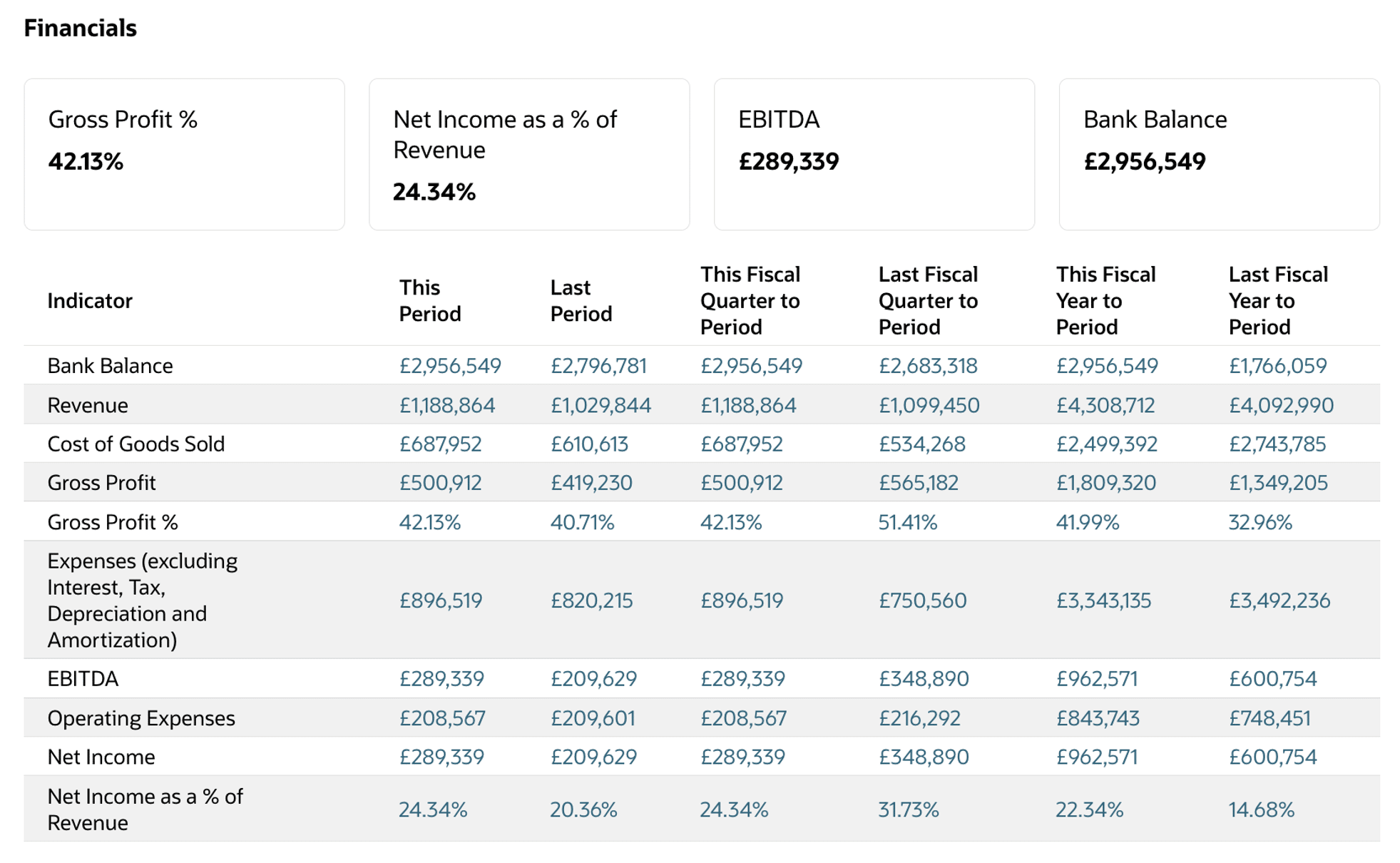
Benchmark 360 is a new SuiteApp that provides industry benchmarks for key performance indicators (KPIs), helping businesses measure and compare their performance against similar companies within the same industry and region.
Key Features:
Industry Benchmarking
Allows businesses to compare their performance with similar companies, offering insights into their market position.
Customisable Performance Metrics
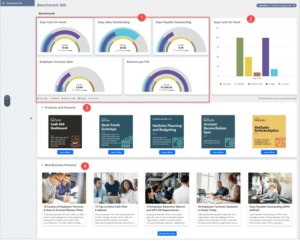
Features a dashboard with five KPIs (e.g., days cash on hand, revenue per full-time equivalent) and allows setting target values aligned with industry standards.
Discover New NetSuite Products
Displays NetSuite products and features used by similar businesses, suggesting tools that could enhance operations.
Benchmark 360 empowers companies to improve performance through relevant industry insights and encourages the adoption of NetSuite’s best practices.
Number 5 – SuiteBilling Enhancements:
The latest SuiteBilling update enhances subscription management with several key improvements:
Prepaid Usage with Monthly Consumption
Customers can prepay a set amount for services, with usage deducted from the prepaid balance. Additional prepayments or pay-as-you-go options are available once the balance is exhausted.
Subscription Flexibility
Businesses can now create custom subscriptions without needing a basic plan or price book, offering greater flexibility, including searching subscriptions by price book.
Automated Customer Alerts
New automated email alerts notify customers of subscription changes, eliminating manual workflows.
These updates enhance the versatility of SuiteBilling, making it more efficient for complex billing scenarios and improving customer communication and subscription management.
Number 4 – Supply Planning Enhancements:
The 2024.2 release enhances the Supply Planning module with new features that improve planning efficiency and flexibility:
Simplified Transaction Management
Users can now remove problematic transactions directly without a full system refresh, making issue resolution quicker.
Flexible Minimum Order Quantities
Minimum order quantities can now be handled with any lot size, adding flexibility to supply planning.
Extended Planning Horizons
The planning horizon and lead times have been extended from one year to almost ten years, allowing for more advanced long-term planning.
These enhancements streamline complex supply chain management and improve the module’s overall efficiency.
Number 3 – WMS Enhancements:
Additionally, the Warehouse Management System(WMS) in NetSuite has received significant enhancements to optimise warehouse operations:
Mobile Inventory Management
Users can now create inventory count plans ad manage cycle counting directly from the mobile app, allowing counts for up to ten items, and automatic submission for approval.
Bin Replenishment Scheduling
Users can set up and manage bin replenishment schedules within NetSuite, including frequency and timing, with notifications for successful or failed runs. Replenishment tasks are accessible on the mobile app.
Auto-Generate Lot Numbers
Lot numbers can now be automatically generated during the assembly build process on the mobile app, streamlining lot numbering in work orders.
These updates enhance warehouse efficiency by improving inventory management, replenishment, and order fulfilment capabilities.
Number 2 – NetSuite Customer 360:
NetSuite Customer 360 is a powerful new feature that provides a comprehensive view of customer information on a single page.
Key Features:
Unified Customer View
Aggregates data from various sources to present a complete picture of each customer.
Historical Sales Data and Recommendations
Provides insights into past sales and suggests product recommendations, making it easier to identify cross-selling and upselling opportunities.
Enhanced Reporting
Simplifies tracking and reporting on customer sales activities, whether from a CRM or accounting perspective, improving customer relationship management and analysis.
NetSuite Customer 360 enhances visibility into customer interactions and financials, allowing for more informed decision-making and better-targeted marketing strategies.
Number 1 – New User License Types:
NetSuite has introduced two key new licenses:
CRM Licenses
Manage CRM functions like campaigns, opportunities, quotes, sales orders, cases, and CPQ features. They offer customisable permissions but exclude invoicing capabilities.
View and Approve Licenses
Allow users to view and approve transactions, invoices, and reports, with customisation options to restrict access to specific subsidiaries or departments. Users can only view and approve, not perform other actions.
Implementation and Costs
Existing customers can add new licenses immediately but may need to wait until contract renewal to switch completely.
Pricing details for these licenses will be available soon; customers should contact their account manager for specific guidance.
These new licenses offer more tailored access to NetSuite, enhancing operational efficiency.
What’s next?:
We hope you start to benefit from these features over the coming months. If you’re a NetSuite user but suspect there is more potential within the system, we’d be happy to discuss your options.
Alternatively, if you find yourself currently utilising a legacy system and see the potential benefits of adopting NetSuite with its semi-annual updates, we encourage you to reach out.
For further details, please feel free to get in touch with Richard Christie, our Business Systems Specialist, at 01355 581960 or via email at richard.christie@eurekasolutions.co.uk